// freehire on the command line
Search and track
from the terminal.
A small CLI and an MCP server over the same API the site runs on — so you, a script or an AI agent can search jobs, track applications and tailor a CV without opening a browser.
Not on the terminal? Every way to connect an agent — MCP hosts, ChatGPT, and your own client.
- 1
Install — no Go needed
curl -fsSL https://freehire.me/install.sh | sh - 2
Sign in — opens your browser, no key to paste
freehire auth login - 3
Search
freehire search "golang" --remote --region eu
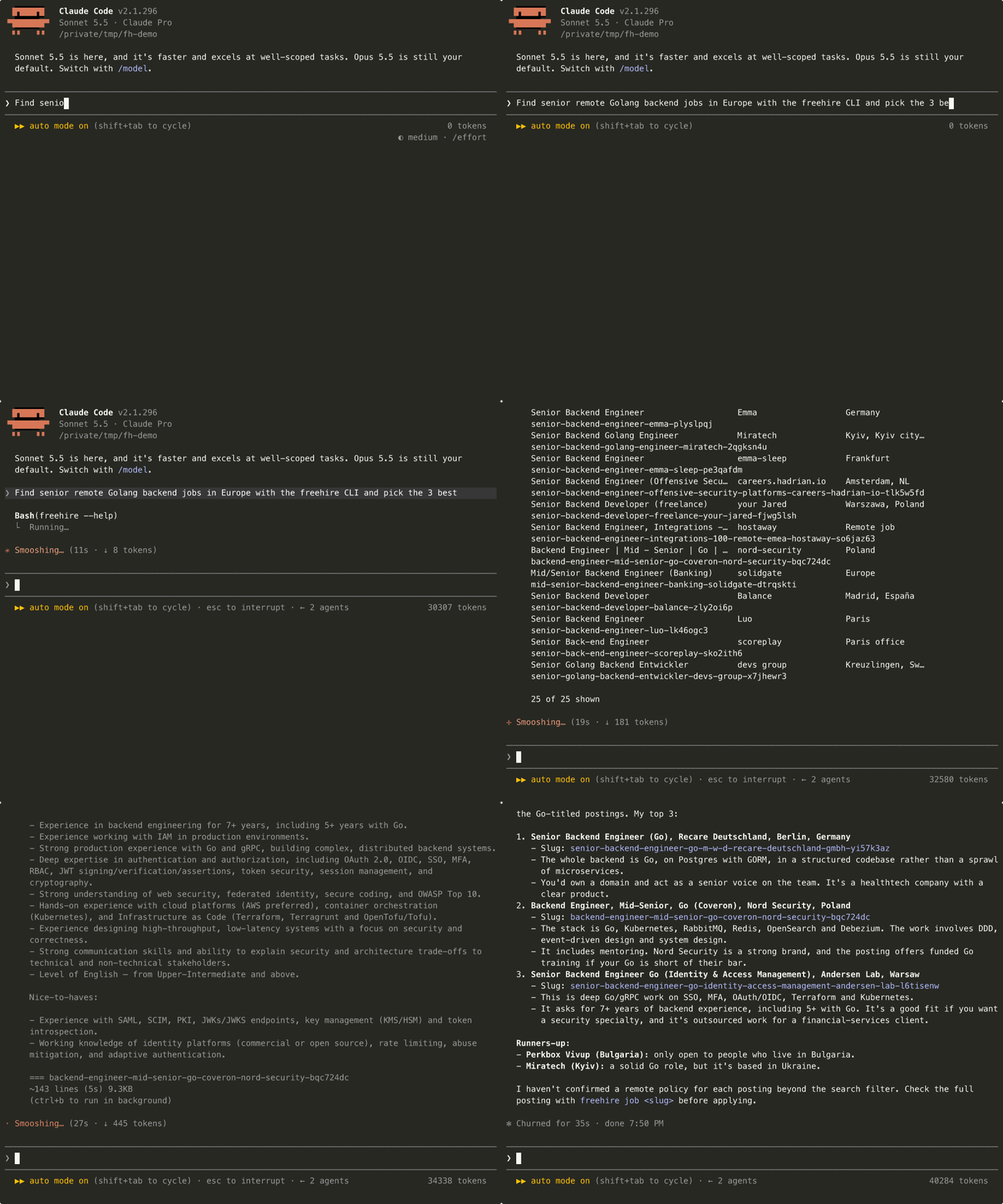
// in claude code
Ask in plain words. The agent runs the CLI.
One request — “find senior remote Golang backend jobs in Europe and pick the 3 best”. Claude Code searches with freehire search, reads the
postings with freehire job, and explains its picks.
A real, unedited session against the live catalogue, sped up 1.5×.
// commands
What it can do
Every command takes --json for the raw API payload.
Start from facets — it lists every filter's live values, so search and market-fit use real values, not guesses.
- freehire facets
- Every filter's live values and counts.
- freehire search <query>
- Matching jobs. Add --remote, --region, --company.
- freehire job <slug>
- A job's full content.
- freehire company <slug>
- A company and its open jobs.
- freehire market-fit --skills go,react
- How much of the live market your skills cover, and the gaps.
Everything you save, apply to and stage shows up on your Tracking board. You still apply on the employer’s site — the CLI records that you did.
- freehire save <slug>
- Bookmark a job (unsave to remove).
- freehire apply <slug>
- Mark a job applied.
- freehire stage <slug> <stage>
- preparing → applied → screening → responded → interview → offer → accepted, or rejected / withdrawn.
- freehire note <slug> <text>
- Attach a free-text note.
- freehire my --filter applied
- Your tracked jobs: all, viewed, saved or applied.
- freehire profile
- Your saved search profile — skills, seniority, regions.
Reframe your CV toward one job, grounded in what you actually did, then export an ATS-ready PDF. cv context splits the job's requirements into the ones your history covers but buries (reframe those) and the ones it doesn't (ask, don't invent).
- freehire cv context <id>
- The match analysis to reframe toward.
- freehire cv get <id>
- The CV document as JSON.
- freehire cv edit <id> --set …
- One edit by path (--ops for a batch).
- freehire cv render <id> --out cv.pdf
- Export the PDF.
freehire fetches no mail on this tier: your own client does, and inbox push hands it over. Then an agent judges each message and links it to an application.
- freehire inbox push --file mail.json
- Upload a batch. Keyed by Message-ID, so a re-sync updates instead of duplicating.
- freehire inbox list --unclassified --body
- The work queue: unjudged mail with bodies inline.
- freehire inbox triage <id> <signal>
- Record what a message is; a confident verdict moves the application forward.
- freehire inbox list --link suggested
- Proposed links awaiting your word — inbox confirm / inbox reject.
- freehire inbox list --link unlinked
- Mail with no application — inbox application records one from it.
Widen the catalogue. The last two need the moderator role.
- freehire contribute <url>
- Hand freehire a job link; a board we don't track yet gets added and crawled.
- freehire contributions
- The boards you've contributed and their state.
- freehire submissions
- Jobs you submitted, and the review queue for moderators.
- freehire jobs add --url <url> --title … --company …
- Author a posting (moderator).
- freehire jobs edit <slug> --title …
- Edit a posting (moderator).
// mcp
Same sign-in, any AI host
freehire-mcp exposes the same search, market-fit and
tracking tools over the Model Context Protocol, so Claude Desktop, Claude Code or any MCP host can drive freehire. It runs via npx — no global install.
It reads the CLI's sign-in from ~/.freehire/creds.json.
On a machine without it, add "env": { "FREEHIRE_TOKEN": "fhk_…" } with a key
from API keys.
{
  "mcpServers": {
    "freehire": {
      "command": "npx",
      "args": ["-y", "freehire-mcp"]
    }
  }
}
// for ai agents
Five skills, one per job
Each agent skill is named for the task, so a host loads only what the question needs. Install the Claude Code plugin to get them with their slash commands.
/plugin marketplace add strelov1/freehire-cli
/plugin install freehire@freehire-cli
- /job-search
- Read the saved profile, ground every filter in facets, search, and shortlist.
- /track-applications
- Where each application stands, stage moves, and reporting one that never answered.
- /market-fit
- Score a stack against live vacancy demand and put a number on every gap.
- /tailor-cv
- Reframe a CV toward one vacancy — every claim cited, nothing invented.
- /triage-inbox
- Push a mail batch, judge each message, and drain the two link queues.
Free and open source — no tracking, no lock-in. Read every line of the CLI ↗ and the MCP server ↗ on GitHub. The same endpoints are in the API reference.